Exploration
Stuck doors: distinguish vegetation barriers from terminal controls
A vegetation-stuck door and a terminal-controlled door need different checks. In a completed-demo account, ook says the tutorial suggests clearing stuck-door vegetation from the other side, but that they could also break those doors by punching with bare fists.
This is a limited October 10 player observation. It is not a guarantee for every door, a fixed ten-second rule, or an instruction to break an airlock. Exact terminal commands are not verified here.
Your next check
Identify the barrier before choosing an action
- 01Obscured route → inspect the view
- 02Vegetation-stuck door → check another approach
- 03Breaking report → limited current-player observation
- 04Terminal / airlock → do not guess a universal command
On this page
First identify the obstacle
| What blocks you | Useful branch | Avoid assuming |
|---|---|---|
| A door described as stuck by vegetation | Inspect another approach; compare the limited breaking report | Every blocked door opens in the same way |
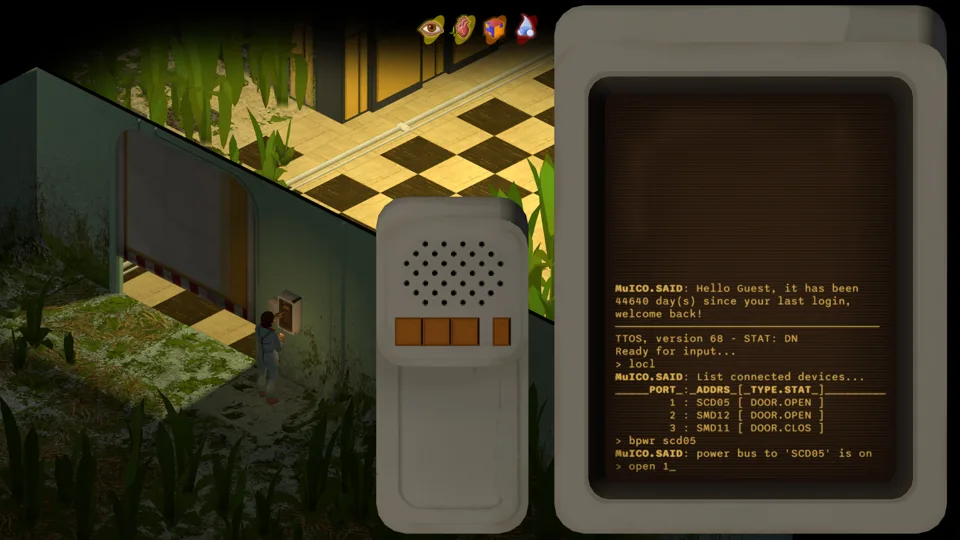
| A door linked to a computer terminal | Read that terminal's actual interface and connected devices | A guessed command or physical attack is the correct unlock |
| Walls hide the doorway | Change the view and regain your route orientation | An obscured route is necessarily a locked door |
The reported vegetation-door approach
- Get a clear view of the door and the growth around it. Move away from immediate enemies before working on an obstacle.
- Check whether you can reach the other side by a known route. ook describes clearing from that side as the tutorial's intended approach.
- If your door matches the reported stuck-door scenario and you choose to try breaking it, the player account specifically describes bare-fist attacks. It does not require a made-up key or terminal command.
- Watch for the barrier actually breaking and the route becoming traversable. If nothing changes, stop treating it as a match for that account.
- Inspect the opened space before committing to it, and retain a route back. The player often found supplies behind such doors; no fixed room or guaranteed loot is identified.
ook reports no fist damage in their own attempt. We do not extend that observation into an immunity rule, a measured timing requirement or proof that every installed build behaves identically.
Terminal doors are a separate system
The developer's demo announcement says terminals use free keyboard input to operate doors and lights and interact with ship systems, including airlocks. That confirms the system exists; it does not give the exact command for the terminal in front of you.
Read the local terminal's displayed information before using a command. If you cannot identify a supported action, preserve the door/device label and the visible response for a specific help request. This guide does not supply a universal unlock string.
The player's aside about punching airlock doors is not our recommended shortcut. We have not verified the consequences of opening that particular boundary or whether the reported method applies to your airlock.
If the route still does not work
Use the camera and return-route method to distinguish a hidden passage from a real barrier. A different approach may be easier to understand once the view is stable.
If normal interactions changed only after loading, compare the save and world-state reports; the known algae-cleaning report is not proof of a door bug. Report the actual door symptom separately rather than calling an untested file edit or terminal command a fix.
Sources & version
Current public-demo community observations and developer notes. Player reports are attributed to their original author and scenario; this site does not claim its own gameplay test. A reading date does not establish a new patch or a universal result.
- feetmusk: any gameplay tips? — ook October 10 completed-demo reply: stuck vegetation doors, breaking observation and route limitations
- Official October 8 demo announcement — keyboard-input terminals, doors, lights and airlocks
Official Steam news: latest visible demo announcement October 8 when checked October 12. Exact installed build number not confirmed. The parent game's future release is outside these guides.